 Habiter
Study timer for iPhone
A study habit with the timer built in.
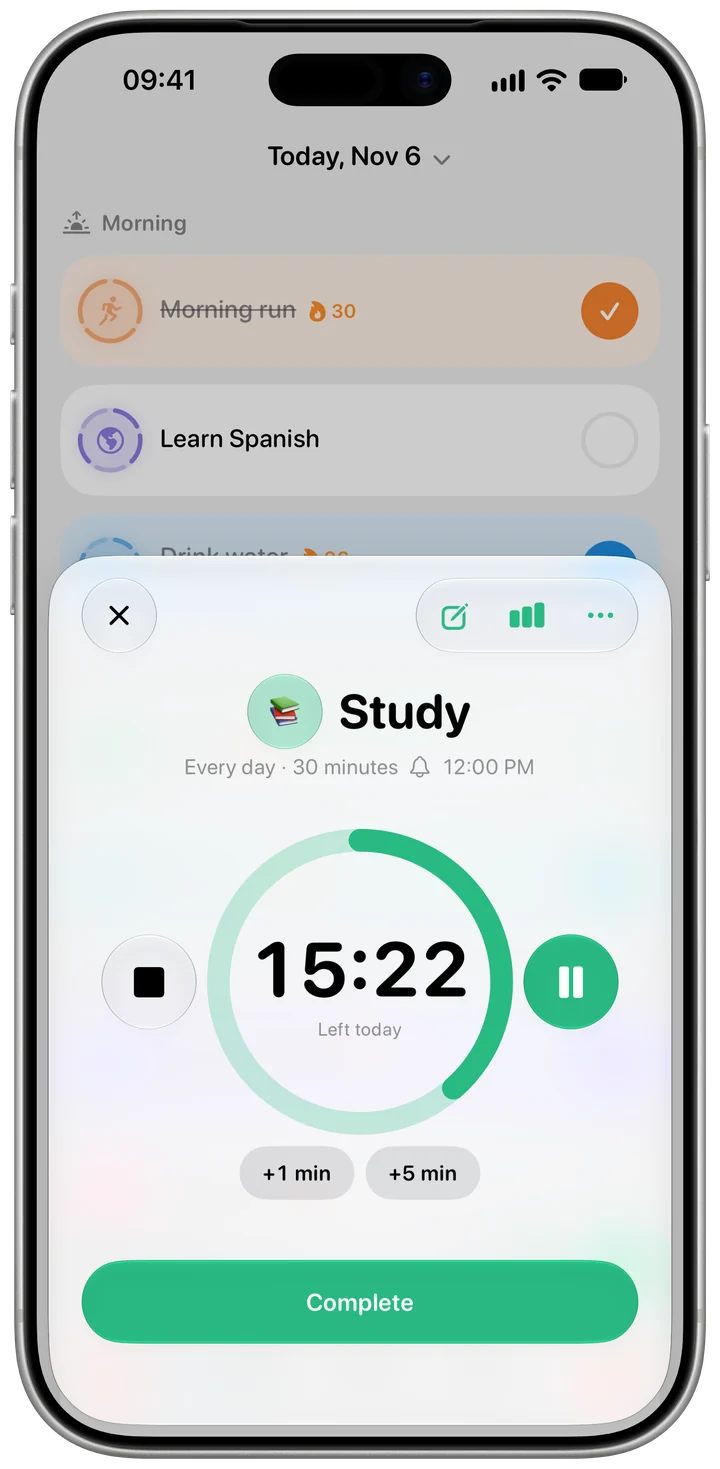
The Study template sets a goal of 30 minutes a day. When you sit down to work, one tap starts a focus timer for the minutes left today, and when you finish, the day is ticked.
 Free · No account · No ads
How it works in Habiter
- 1
Set your minutes
30 minutes a day to start; change it on the habit's Goal page. A reminder comes at noon unless you move it.
- 2
One tap to start
Tap the timer button on the Study row. The timer starts right away for the minutes left today.
- 3
Stay on track
Pause, resume or add one or five minutes. The timer also shows on the Lock Screen and in the Dynamic Island, with Pause and Finish.
- 4
Finish to tick the day
Tap "Complete", or Finish on the Lock Screen, and the day's goal is done; "Stop" ends the session without ticking it. If the time runs out, a notification tells you the session is complete.
Making it stick
- Same desk, same time
Studying at a fixed time and place leaves one decision: starting the timer.
- Ask Siri to start
Say "Start focus timer for Study in Habiter" and it starts without touching the phone.
- Turn the phone face down
The Lock Screen shows the time left, so there's no reason to unlock it until you're done.
What you get for free
- A daily goal in minutes
- A one-tap focus timer you can pause and extend
- The timer on the Lock Screen and in the Dynamic Island
- Starting it with Siri
Questions people ask
Is the study timer free?
Yes. The focus timer, the Lock Screen timer and starting it with Siri are free, with no ads. The free plan keeps up to 5 habits.
Can I use it for other kinds of focused work?
Yes. Every habit with a goal in minutes, such as Learn a language, has the same focus timer.
Does it block other apps?
No. Habiter doesn't block apps; the timer keeps time and ticks the habit when you finish.
Similar habits
Wake up early
A real alarm that rings on silent and ticks your wake-up habit when you stop it.
Meditation
A ten-minute meditation timer with guided breathing, calming sounds and a bell at the end.
Quit social media
A clean-time counter for days off social media, a three-minute craving timer and a log of what sets you off.