 Habiter
Skincare routine tracker for iPhone
Your morning and night skincare, step by step.
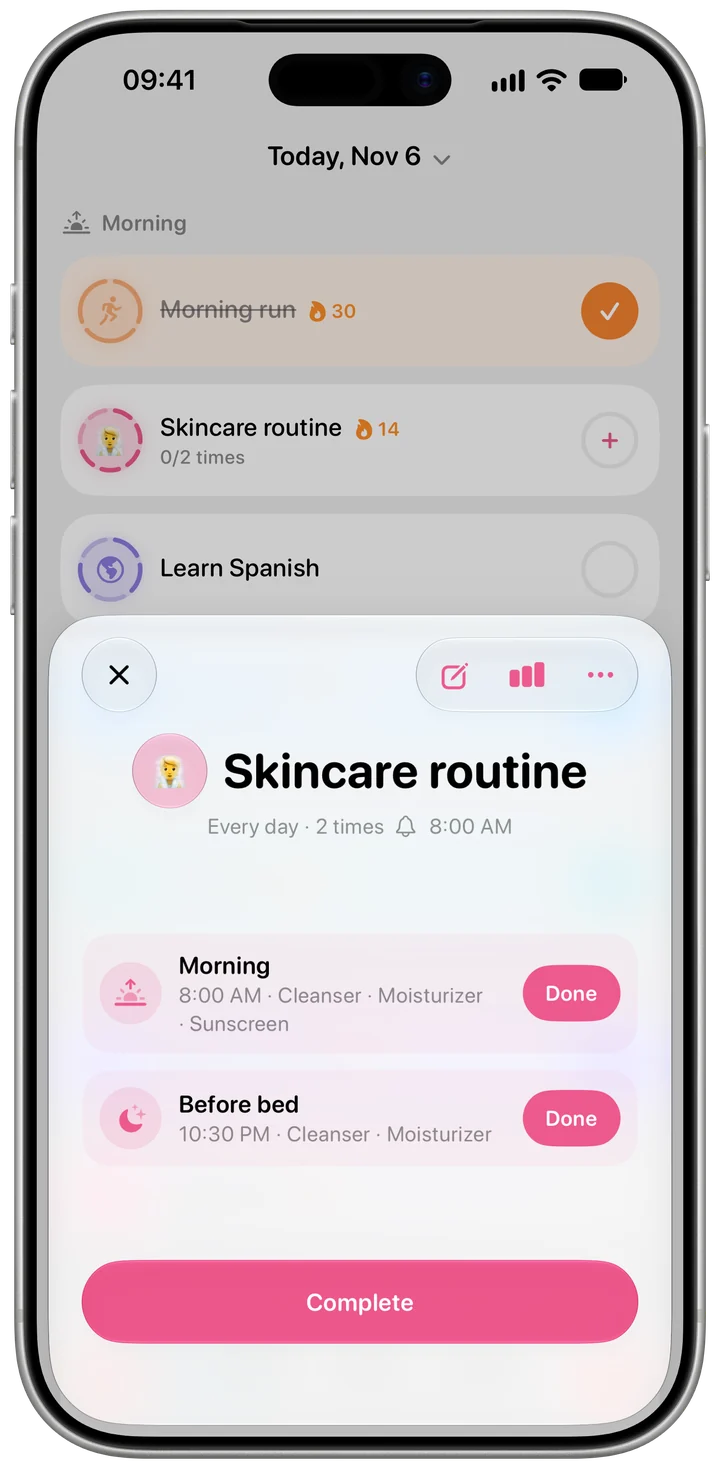
The Skincare routine template starts with a morning and a bedtime routine: cleanser and moisturizer in both, sunscreen in the morning. Change the steps to match your shelf, and every reminder lists exactly what to do.
 Free · No account · No ads
How it works in Habiter
- 1
Two routines to start
Morning at 8 am and before bed at 10:30 pm, each with its own reminder. Add a midday or evening routine if you have one.
- 2
Your steps, per routine
Pick from cleanser, toner, serum, moisturizer and sunscreen in the morning, and makeup remover, retinol and eye cream at night, or add a step of your own.
- 3
Reminders that list the steps
At the time, the reminder reads like "Morning: Cleanser, Moisturizer and Sunscreen." Tap "Done" when you've finished the routine.
- 4
A week at a glance
The habit page shows the last seven days with a row for each routine, so a skipped night routine is easy to spot.
Making it stick
- Keep the night routine short
Night is the routine most often skipped. Two or three steps are easier to keep than seven.
- Leave sunscreen in the morning list
It's there from the start, so the reminder brings it up every morning.
- Update the steps when your products change
Add or remove a step on the habit's Goal page whenever your shelf changes.
What you get for free
- Morning and night routines with their own reminders
- Your own steps for each routine
- Reminders that list the steps
- One-tap check-off and a seven-day view
Questions people ask
Is the skincare tracker free?
Yes, all of it, with no ads. The free plan keeps up to 5 habits.
Can I tick steps one by one?
No. Each routine is one tap: you tick the morning routine once you've done its steps. The steps are your checklist and appear in the reminder.
Can I have different steps in the morning and at night?
Yes. Each routine has its own list, so retinol can stay in the night routine and sunscreen in the morning one.
Similar habits
Brushing teeth
Morning and bedtime brushing with a two-minute guided timer, saved to Apple Health if you like.
Vitamin reminder
Reminds you by name at the times you take your vitamins; one tap marks them taken.
Healthy eating
Breakfast, lunch and dinner reminders, a photo before you eat and a week-long meal diary.