 Habiter
Healthy eating tracker for iPhone
Healthy eating, one meal at a time.
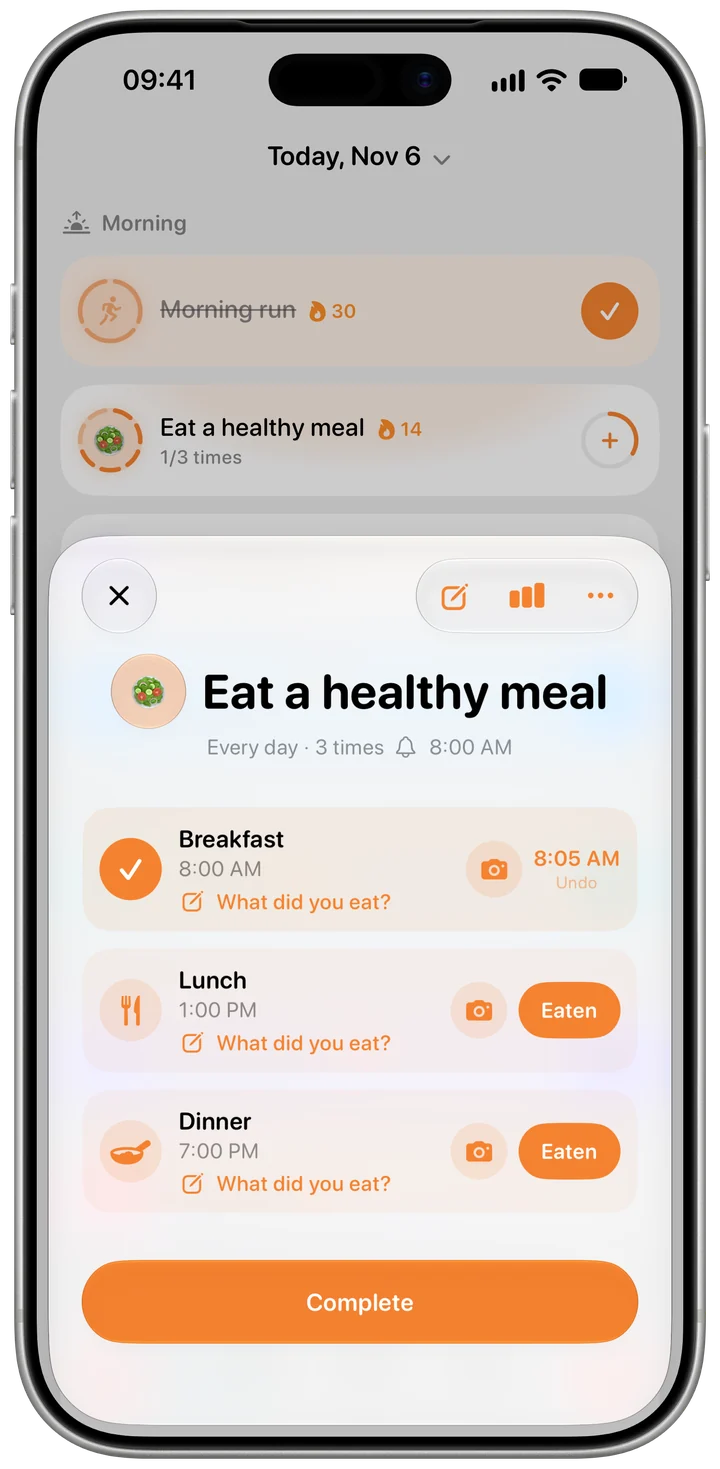
The Eat a healthy meal template gives breakfast, lunch and dinner their own reminder. Snap your plate before you eat, or write what you had, and the meal is ticked. No calorie counting, just a clear record of how you eat.
 Free · No account · No ads
How it works in Habiter
- 1
Pick your meals
Breakfast at 8 am, lunch at 1 pm and dinner at 7 pm come ready, each with a reminder. Add a snack at 4:30 pm if you like.
- 2
A photo before you eat
Take a photo of your plate from the meal's card and the meal is ticked. You can also write what you ate, or just tap "Eaten".
- 3
Your meal diary
The habit page lays out the last seven days, a row for each day and a column for each meal, so you can see what you really ate this week.
- 4
Photos stay yours
Photos are kept in your own iCloud, or only on your phone without iCloud. Delete one any time; the meal stays ticked.
Making it stick
- Photograph first, judge later
The point is a record, not a score. A week of plates shows patterns a single meal can't.
- Start with one meal
If three a day feels like a lot, keep only the meal that matters most to you and add the others later.
- Use a note when you can't take a photo
A short note like "lentil soup and salad" ticks the meal just as well.
What you get for free
- A reminder for each meal
- A photo or a note for every meal
- A seven-day meal diary
- Photos synced through your own iCloud
Questions people ask
Is the healthy eating tracker free?
Yes. Photos, notes, reminders and the meal diary are free, with no ads. The free plan keeps up to 5 habits.
Does it count calories?
No. Habiter keeps a record of your meals with photos and notes; it doesn't count calories or nutrients. For a simple count instead, the Log your meals template adds one for each meal, three a day to start.
Where are my meal photos stored?
In your private iCloud, so they appear on your other devices, or only on your phone if iCloud is off. They're deleted with the habit.
Similar habits
Vitamin reminder
Reminds you by name at the times you take your vitamins; one tap marks them taken.
No-spend days
A daily check-off for days you buy nothing extra, with a streak and a reminder at noon.
Home workout
Bodyweight workouts planned for your level, with a drawn guide, a voice coach and rep counting.